
Reviews
Colorful Tank Arena Multiplayer offers a refreshing take on tank strategy with its local multiplayer focus. The simple controls make it easy for anyone to join, while the strategic depth keeps matches engaging. The bright, cheerful visuals ensure a safe environment for all ages. Perfect for parties or quick gaming sessions.
About this game
Game Introduction
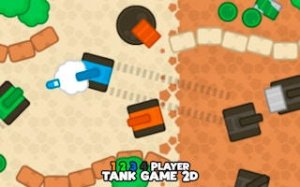
Colorful Tank Arena Multiplayer is a local multiplayer game where up to four players control brightly colored tanks. The core objective is to outmaneuver opponents using smart positioning and timing. Each player uses dedicated keys, making it easy to jump into the arena with friends. No internet connection is required, so players can gather around one device for fast-paced matches. With simple controls and bright visuals, this game is ideal for family gatherings or quick breaks. The experience focuses on tactical tank challenges without any graphic content, offering pure strategic fun. The game supports 1 to 4 players, allowing for solo practice or group play. Each tank has a distinct color and control scheme, adding variety to each match. The arena includes walls and obstacles that players can use for cover, encouraging thoughtful movement and planning. The game is designed to be accessible to players of all ages, making it a great choice for casual gaming sessions. The bright, colorful visuals create a cheerful atmosphere, while the simple mechanics ensure that anyone can start playing quickly. Whether playing alone or with friends, the game offers endless replayability through different strategies and player combinations.
How to Play
Players select a colored tank, each with its own control scheme. For example, one tank may use the W, A, S, D keys to move and a separate key to fire. Another tank might use the Arrow Keys for movement and a different key to fire. The objective is to defeat more enemy tanks than anyone else by shooting them with the tank's blaster. Players use walls and obstacles for cover and anticipate enemy movements to gain an advantage. The player with the most defeats at the end of the round wins. Practice helps players learn each tank's handling to master the arena. The game is turn-based or real-time, depending on the mode, and rewards careful planning and quick reflexes.
Game Features
Local multiplayer mayhem for 1 to 4 players. Strategic tank combat that rewards planning and reflexes. Simple, accessible controls that anyone can learn quickly. Endless replayability with different tank colors and strategies. Family-friendly fun with no graphic content. Perfect for parties, gatherings, or solo practice against AI opponents. The game may include various game modes such as free-for-all or team play. The bright, colorful visuals ensure a cheerful and non-violent experience.
Tips for Success
To excel in Colorful Tank Arena Multiplayer, focus on map awareness and positioning. Use walls and obstacles to shield yourself while planning attacks. Practice each tank's unique controls to improve reaction time. Coordinate with teammates if playing in teams, and always anticipate enemy movements. Consistent practice will help you master the arena and outsmart opponents.



Comments
Sign in to leave a review
No account? Create one
No comments yet.